
I’m building FluxShot Editor, a node-based VFX compositor for macOS, Linux, and Windows, with help from both Claude and Codex. The macOS and Linux versions are almost complete, but the Windows port still needs a lot of work.
The Codex agent working on Windows needed to know whether its changes fit with other work in flight. It also needed to test its pull requests on macOS and on a Linux machine with a GPU. Those requests and their results had to survive interrupted connections and agent sessions ending. My Mac laptop travels with me and changes networks, so coordination could not depend on a fixed address or inbound connections to the laptop.
As I couldn’t find a simple way to do this, I built Tasklease to coordinate tasks across operating systems and agent runtimes. It is easy to deploy into your own Cloudflare account and needs no special network configuration on the machines that use it.
A task orchestrator
For a Linux test run, the agent on my Mac posts a small JSON task to verify/linux. It identifies the repository, commit, and verification profile, and names a topic for the reply, such as verified/mac-1.
The task waits in the service until a deterministic Linux worker claims it. The worker checks out the commit, runs the requested tests, and uploads the log to R2. When it finishes, it completes the task and posts a reply containing the result and a reference to the log. Tasklease commits both changes together: the request disappears from the work queue in the same transaction that creates its reply.
The requester on my Mac saves the reply locally before acknowledging the server’s copy. If the laptop is offline when the tests finish, the reply waits in its topic. When the requester reconnects, it can collect the result.
In my setup, all three machines connect to the same service:
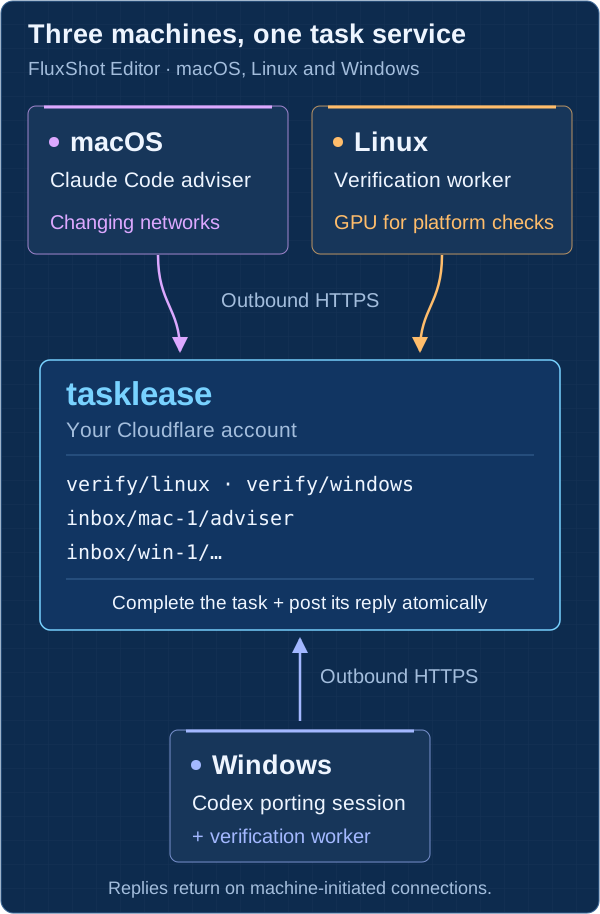
The service runs in my Cloudflare account. A Cloudflare Worker handles the HTTPS API, SQLite Durable Objects hold the tasks, and R2 holds large files such as test logs. Each machine opens its own outbound HTTPS connections to post work and wait for tasks or replies. The arrows show who opens the connection. My laptop can reconnect from another network without the other machines needing its address.
Questions between agents travel through inbox topics such as inbox/mac-1/adviser. FluxShot supplies the session commands the agents call from their shells and the verification handler that knows how to check out and test its code. Tasklease supplies the task transport, worker runtime, and reply storage. Claude and Codex use the same service through those project commands.
Keeping work and replies together
A test run can outlive a network connection or the process that started it. Four parts of the protocol handle the handoff:
- Topics route the work. A Linux worker claims tasks from
verify/linux; the Mac adviser listens on its own inbox. Workers serving the same topic compete to claim each task. - Leases keep a claim active while the worker runs. Each claim or renewal can last up to 24 hours, and the worker runtime renews it during long jobs. If the worker stops, its lease expires and another worker serving that topic can claim the task.
- Task IDs change on every claim. If a disconnected worker returns after another worker has claimed its task, its old ID no longer works. It cannot complete the task or post a late reply through that ID.
- Consume completes a task and posts its reply in one SQLite transaction. It can also post up to 16 successor tasks, so a handler can hand work to the next stages of a pipeline in the same operation.
For worker replies, the service preserves an origin_id from the original request through each claim and completion. The requester uses it to match the result to the saved request even though the task IDs have changed. Session conversations that post answers as separate tasks track which message they answer in application fields.
A crash can still cause the tests to run again. If a handler publishes an artifact or writes to another service, it must make that operation safe to repeat. Tasklease’s transaction covers the task and its successors; it cannot include an external side effect. Handler failures produce failure replies, and application code decides whether to retry them.
I check these rules with Hypothesis tests that compare the Worker and in-memory implementation against an independent protocol model, exercising lease expiry, stale IDs, retries, and lost responses. A bounded TLA+ model also checks that retired IDs stay retired, successor tasks preserve their origin, and cancellation leaves downstream tasks intact. The verification documentation describes the checks and their bounds.
What the exchange looked like
During one afternoon of porting the test suite, the Codex session on Windows and the Claude Code adviser on macOS exchanged 19 messages over 4 hours and 52 minutes: seven questions, seven first answers, and five status notes. The questions covered what to port next, which failures already existed on macOS, and whether a particular commit was ready to merge.
Separately, from November 9 through 12, the Mac sent 13 verification requests to Linux and Windows. Their recorded run durations totalled 348 minutes. The two Windows foundation runs took 3.1 and 4.5 minutes from claim to reply. A Linux display run passed 111 tests under Xvfb. The interactive explainer shows both sets of records.
Where it fits
Tasklease fits this setup because I have mulitiple machines with different operating systems and GPUs. I need to send a particular commit to the right machine and get a result back. I also need an agent to ask another agent for advice without copying messages between terminals on different machines.
Tasklease leaves larger workflow decisions to the application. If a merge must wait for both a Mac result and a Linux result, the application keeps track of which have arrived. Tasklease has no built-in joins, durable timers, or compensation steps. For a process that needs a durable record of its whole execution, I would use a workflow engine such as Temporal.
I also load-tested the service on a paid Workers plan. With 5,000 simulated workers, each using its own token and polling every 30 seconds, one domain handled 181 API requests per second without errors. Tasklease easily
scales to thousands of workers and millions of tasks for a single domain. It’s simple protocol and specification makes it easy to build more complex workflow on top of it.
Trying it
The client and worker runtime need Python 3.12 or newer. The package includes the service bundle. Deploying it also needs Node.js, a Cloudflare account with Workers and R2 enabled, and a Wrangler sign-in:
| |
On the first deployment, follow the printed instructions to save the admin token, set TL_ADMIN_TOKEN to it, create R2 access keys for the bucket, and rerun the command with those keys. The deploy command provisions the Worker, storage, bucket, and secrets, then checks a task and file round trip.
Next, issue identities with tokens scoped to the topics each machine may create, claim, and read. Save the client configurations and tokens, then start a worker. The README’s echo example walks through that setup. With its worker.toml and requester.toml configured, start the worker on one machine:
| |
From another machine, send a request and wait for the reply:
| |
That exercises the same request, claim, and reply path as a verification run. Replace the echo handler with one that knows how to do your project’s work. Tasklease is Apache-2.0 on GitHub.